
Introduction
Google Ads Guide for Beginners to Senior Level is designed for students, freelancers, business owners, and digital marketers who want to master Google Ads from basic concepts to advanced campaign optimization. Whether you’re running your first Search campaign or managing enterprise-level advertising accounts, this guide provides a structured learning path to help you build successful Google Ads campaigns.
Google Ads is one of the most powerful digital advertising platforms. It allows businesses to reach customers who are actively searching for products and services, helping increase traffic, leads, sales, and brand awareness.
What is Google Ads?
Google Ads is Google’s online advertising platform that enables businesses to display ads on Google Search, YouTube, Gmail, Google Maps, and millions of partner websites through the Google Display Network.
With Google Ads, advertisers only pay when users click their ads or complete another predefined action.
Why Learn Google Ads?
Learning Google Ads offers several career and business advantages.
Benefits
Better ROI than traditional advertising
High-demand digital marketing skill
Generate quality leads
Increase online sales
Improve brand visibility
Measure campaign performance
Excellent freelancing opportunities
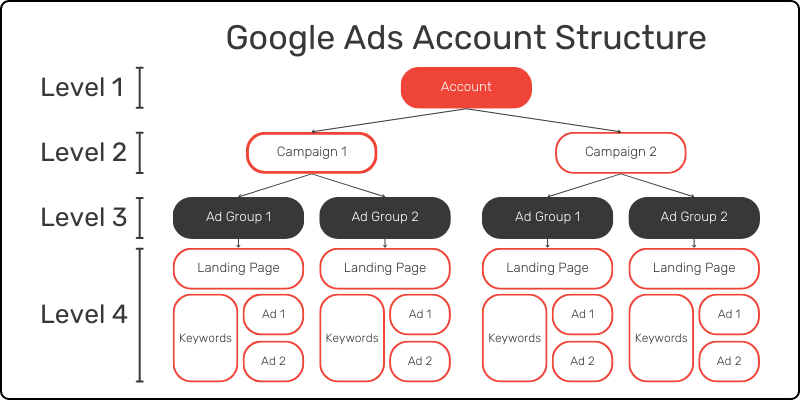
Google Ads Account Structure
Types of Google Ads Campaigns
Here are the main Types of Google Ads Campaigns with a short introduction for each:
1. Search Campaign
Search Campaigns display text ads on Google Search results when users search for specific keywords. They are ideal for generating leads, sales, and website traffic from people actively looking for your products or services.
2. Display Campaign
Display Campaigns show image and banner ads across millions of websites, apps, and Google-owned platforms. They help increase brand awareness and reach a wider audience.
3. Shopping Campaign
Shopping Campaigns promote products with images, prices, and store information directly in Google Search results. They are best suited for eCommerce businesses selling physical products.
4. Video Campaign
Video Campaigns run ads on YouTube and across Google’s video partner network. They are effective for building brand awareness, increasing engagement, and driving conversions through video content.
5. App Campaign
App Campaigns help businesses promote mobile applications across Google Search, Google Play, YouTube, Discover, and the Display Network to drive app installs and user engagement.
6. Performance Max Campaign
Performance Max Campaigns use Google’s AI to show ads across all Google channels—including Search, Display, YouTube, Gmail, Discover, and Maps—from a single campaign to maximize conversions.
7. Demand Gen Campaign
Demand Gen Campaigns help businesses generate demand using visually rich ads across YouTube, Discover, and Gmail. They are designed to engage users earlier in the buying journey.
8. Local Campaign (Legacy – now largely replaced by Performance Max for Store Goals)
Local Campaigns were designed to increase visits to physical business locations by showing ads across Google Search, Maps, Display, and YouTube. Most local objectives are now handled through Performance Max.
9. Smart Campaign
Smart Campaigns are simplified Google Ads campaigns designed for small businesses. Google automates bidding, targeting, and ad placement, making campaign management easy for beginners.
10. Discovery Campaign (Legacy – upgraded to Demand Gen)
Discovery Campaigns displayed visually appealing ads across Google Discover, YouTube Home Feed, and Gmail. These campaigns have now been transitioned into Demand Gen Campaigns.
Conclusion
Google Ads offers multiple campaign types to meet different marketing goals. Whether you want to generate leads, increase website traffic, boost online sales, promote an app, or build brand awareness, choosing the right campaign type helps you achieve better advertising results.
Keyword Research
Keyword research determines which searches your ads should target.
Keyword Research Tools
- Google Keyword Planner
- Google Trends
- SEMrush
- Ahrefs
- Rank Math SEO
- Google Search Console
Choose keywords with good search volume, commercial intent, and manageable competition.
What are Keyword Match Types?
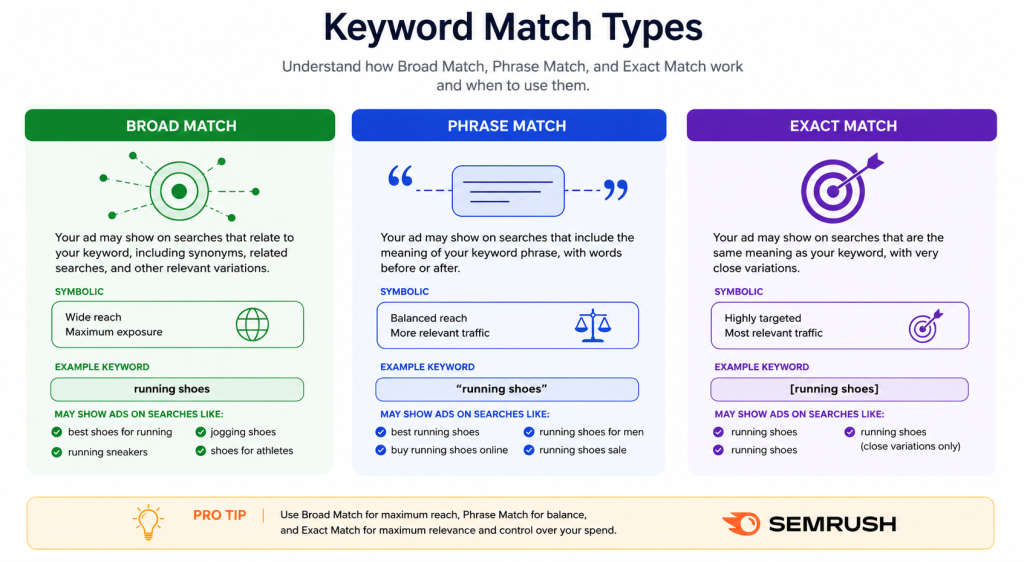
Keyword match types determine how closely a search query must match your keyword for your ad to appear.
Google Ads offers three match types, which means your ad may trigger for:
Broad Match
Broad match allows Google to show your ad for searches loosely related to your keyword.
It considers similar terms, ideas, and search behavior—even if the exact keyword isn’t used.
For “interior paint,” your ad could appear for:
- “Sherwin-Williams”
- “lavender paint”
- “interior design”
Phrase Match
Phrase match shows your ad when the search includes the meaning of your keyword, even if the wording differs slightly.
Extra words can appear before or after. Google may also allow small rewordings if the intent remains the same.
For “interior paint,” your ad might show for:
- “buy interior paint”
- “white wall paint”
- “paint for living room”
But not for “lavender paint” or “home paint ideas,” as the meaning has changed.
Exact Match
Exact match shows your ad only when the search closely matches your keyword’s meaning.
It allows close variations, like reordered words or plural forms. But filters out anything broader.
For “interior paint,” your ad could appear for:
- “interior paint”
- “room paint”
- “paint for interior”
But not for “decorating ideas” or “white paint options,” even if they’re somewhat related.
Google Ads Bidding Strategies
H3 Manual CPC
Full control over bids.
H3 Maximize Clicks
Increase website visits.
H3 Maximize Conversions
Focus on conversions.
H3 Target CPA
Maintain desired cost per acquisition.
H3 Target ROAS
Maximize revenue.
H2 Ad Rank and Quality Score
Google decides ad position using:
- Expected CTR
- Ad Relevance
- Landing Page Experience
- Bid Amount
Improving Quality Score lowers CPC and improves rankings.
H2 Landing Page Optimization
Your landing page should include:
H3 Fast Loading Speed
H3 Mobile Friendly Design
H3 Clear CTA
H3 Relevant Content
H3 Trust Signals
H2 Conversion Tracking
Track important actions such as:
- Contact Form Submissions
- Phone Calls
- Purchases
- Newsletter Signups
- WhatsApp Clicks
Conversion tracking helps optimize campaigns using real performance data.
H2 Important Google Ads Metrics
H3 CTR
Click-through rate.
H3 CPC
Cost Per Click.
H3 CPA
Cost Per Acquisition.
H3 ROAS
Return On Ad Spend.
H3 Conversion Rate
Percentage of visitors completing desired actions.
H2 Campaign Optimization
Optimize campaigns by:
- Reviewing Search Terms
- Adding Negative Keywords
- Improving Ad Copy
- Testing Headlines
- Improving Landing Pages
- Adjusting Bids
- Monitoring Quality Score
- A/B Testing
H2 Advanced Google Ads Strategies
H3 Audience Segmentation
H3 Remarketing
H3 Customer Match
H3 Performance Max Optimization
H3 Value-Based Bidding
H3 Automated Rules
H2 Beginner Roadmap
- Learn Google Ads Interface
- Create Search Campaign
- Keyword Research
- Responsive Search Ads
- Conversion Tracking
H2 Intermediate Roadmap
- Smart Bidding
- Display Campaigns
- Video Campaigns
- Audience Targeting
- Landing Page Optimization
- Conversion Optimization