
I created and optimized a WordPress website as a practical SEO project. The objective was to improve search engine visibility by implementing On-Page SEO, Technical SEO, Keyword Research, Google Search Console, and Rank Math optimization.
Project Objectives
- Improve website visibility
- Get pages indexed in Google
- Optimize website speed
- Improve On-Page SEO
- Generate organic traffic
- Create SEO-friendly blog content
Keyword research
Keyword research is the process of finding and analyzing the words and phrases people type into search engines like Google to find information, Products, or services. The goal is to identify the keywords your target audience uses so you can create content that matches their search intent.
For example, if you sell running shoes, you might discover that people search for:
- “best running shoes for beginners”
- “trail running shoes”
- “running shoes under 1000”
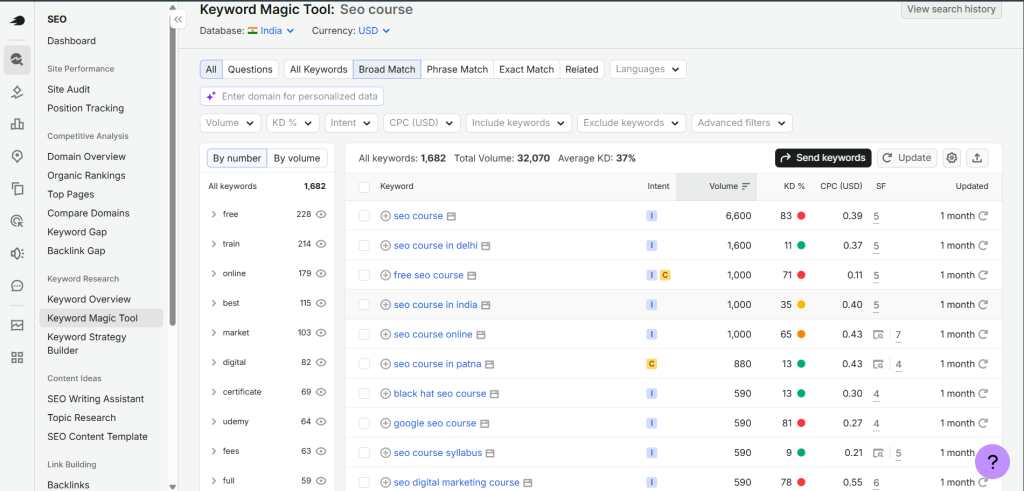
Keyword research tools
- Google Keyword Planner
- Ubersuggest
- Google Search
- Semrush
- Answer The Public
- Keyword.io
- Neilpatel
- Google Search Console
- Moz Keyword Explorer
Why keyword research is important
- Understand User Intent
- Increase Organic Traffic
- Create Better Content
- Find Low Competition Opportunities
- Improve Conversion
- Understand Competitors
Types of Keywords
There are many ways to classify keywords.
A. Based on Length
Short-tail Keywords
- 1–2 words
- High search volume
- High competition
Examples:
- SEO
- Shoes
- Laptop
Medium-tail Keywords
- 2–3 words
- Moderate competition
Examples:
- SEO services
- Running shoes
- Gaming laptop
Long-tail Keywords
- 4+ words
- Lower competition
- Higher conversion
Examples:
- Best SEO company in Delhi
- Running shoes for flat feet
- Best gaming laptop under ₹70,000
B. Based on Search Intent
Informational Keywords
Users want information.
Examples:
- What is SEO
- How to learn Google Ads
- How does WordPress work
Navigational Keywords
Users want a specific website.
Examples:
- Facebook Login
- YouTube
- Amazon India
Commercial Investigation Keywords
Users are comparing before buying.
Examples:
- Best DSLR camera
- Ahrefs vs Semrush
- Best SEO tools
Transactional Keywords
Users are ready to buy or take action.
Examples:
- Buy iPhone
- SEO agency near me
- Hire SEO expert
C. Local Keywords
Target a specific location.
Examples:
- Dentist in Delhi
- SEO company in Gurgaon
- Restaurant near Connaught Place
D. Branded Keywords
Contain a brand name.
Examples:
- Nike shoes
- Apple iPhone
- Semrush pricing
E. Non-Branded Keywords
Do not mention any brand.
Examples:
- Running shoes
- SEO tools
- Smartphones
3. How to Do Keyword Research
Follow this step-by-step process.
Step 1: Understand Your Business
Ask yourself:
- What do I sell?
- What problems do I solve?
- Who is my target audience?
Example:
Business = SEO Agency
Services:
- SEO Audit
- Technical SEO
- Local SEO
- Keyword Research
Step 2: Create Seed Keywords
Seed keywords are basic terms related to your business.
Example:
- SEO
- Google Ads
- WordPress
- Digital Marketing
Step 3: Use Keyword Research Tools
Popular tools include:
- Google Keyword Planner (Free)
- Google Search (Autocomplete)
- Google Trends
- Google Search Console
- Ubersuggest
- Ahrefs
- Semrush
- AnswerThePublic
Step 4: Find Keyword Ideas
Suppose your seed keyword is:
SEO
Possible keyword ideas:
- SEO services
- SEO audit
- SEO checklist
- SEO expert
- Technical SEO
- Local SEO
- SEO course
- SEO interview questions
Step 5: Check Important Metrics
When evaluating a keyword, look at:
| Metric | Meaning |
|---|---|
| Search Volume | Monthly searches |
| Keyword Difficulty (KD) | How hard it is to rank |
| CPC | Cost per click in ads |
| Competition | Level of advertiser competition |
| Search Intent | What users want |
| Trend | Whether interest is increasing or decreasing |
Step 6: Analyze Competitors
Search your keyword on Google and check:
- Who ranks in the top 10?
- What topics do they cover?
- How detailed is their content?
- What keywords do they use?
Step 7: Select Primary and Secondary Keywords
Example:
Primary Keyword:
- SEO Audit
Secondary Keywords:
- Website SEO Audit
- Technical SEO Audit
- SEO Audit Checklist
- Free SEO Audit Tool
Step 8: Group Related Keywords
Example Cluster:
Pillar Topic: SEO
Supporting Topics:
- On-Page SEO
- Off-Page SEO
- Technical SEO
- Local SEO
- SEO Audit
- Keyword Research
- Link Building
This helps build a strong content structure.
Step 9: Use Keywords Naturally
Place your primary keyword in important areas such as:
- Page title
- URL
- Meta title and meta description
- H1 heading
- First paragraph
- Subheadings (where relevant)
- Image alt text
- Conclusion
Avoid keyword stuffing. Write naturally for users first.
Example: Keyword Research for an SEO Services Website
| Keyword | Search Intent | Type |
|---|---|---|
| SEO Services | Transactional | Medium-tail |
| SEO Agency Delhi | Local + Transactional | Long-tail |
| Technical SEO | Informational | Medium-tail |
| Website SEO Audit | Commercial | Long-tail |
| Best SEO Company | Commercial Investigation | Long-tail |
| Local SEO Services | Transactional | Long-tail |
| SEO Expert | Transactional | Medium-tail |
| What is SEO | Informational | Informational |
What is a Website SEO Audit?
A Website SEO Audit is a comprehensive analysis of a website to identify issues affecting its visibility and rankings on search engines like Google. It helps you find technical problems, on-page SEO issues, content gaps, and opportunities to improve organic traffic.
Think of it like a health check-up for a website. Just as a doctor checks your body for problems, an SEO audit checks your website for issues that may prevent it from ranking well.
Why is an SEO Audit Important?
An SEO audit helps you:
- Find technical errors that affect rankings.
- Improve website speed and user experience.
- Ensure pages are indexed by Google.
- Fix broken links and crawl errors.
- Optimize content and keywords.
- Increase organic traffic.
- Improve search engine rankings.
Types of SEO Audit
1. Technical SEO Audit
Checks the technical health of the website.
It includes:
- Website speed
- Mobile-friendliness
- HTTPS (SSL certificate)
- XML sitemap
- Robots.txt
- Crawl errors
- Broken links (404 errors)
- Canonical tags
- Structured data (Schema)
- Core Web Vitals
2. On-Page SEO Audit
Checks optimization on individual pages.
It includes:
- Title tags
- Meta descriptions
- Heading tags (H1, H2, H3)
- Keyword placement
- URL structure
- Internal linking
- Image optimization
- Alt text
- Content quality
- Keyword density
3. Off-Page SEO Audit
Evaluates the website’s authority.
It includes:
- Backlink quality
- Toxic backlinks
- Referring domains
- Anchor text distribution
- Domain Authority (DA)
- Page Authority (PA)
4. Content Audit
Reviews the quality and performance of website content.
It includes:
- Duplicate content
- Thin content
- Outdated content
- Keyword optimization
- Search intent alignment
- Readability
5. Local SEO Audit (For Local Businesses)
Checks whether the website is optimized for local searches.
It includes:
- Google Business Profile
- NAP consistency (Name, Address, Phone)
- Local keywords
- Customer reviews
- Local citations
SEO Audit Checklist
| Category | What to Check |
|---|---|
| Technical SEO | Website speed, mobile-friendly design, HTTPS, XML sitemap, robots.txt |
| Indexing | Google Search Console, indexed pages, crawl errors |
| On-Page SEO | Meta title, meta description, headings, URLs, keywords |
| Content | Original, useful, keyword-optimized, no duplicate content |
| Images | Alt text, file size, descriptive filenames |
| Internal Linking | Broken links, orphan pages, link structure |
| Backlinks | Quality backlinks, toxic links, referring domains |
| User Experience | Navigation, page layout, Core Web Vitals |
Tools Used for an SEO Audit
Common tools include:
- Google Search Console – Indexing, coverage, performance, and crawl issues.
- Google Analytics 4 (GA4) – User behavior and traffic insights.
- PageSpeed Insights – Website speed and Core Web Vitals.
- Screaming Frog SEO Spider – Crawls the website to identify technical and on-page issues.
- Semrush – Site audit, keyword research, and backlink analysis.
- Ahrefs – Backlinks, keyword research, and technical SEO.
- Ubersuggest – SEO audit, keyword ideas, and competitor analysis.
- GTmetrix – Website speed testing.
Rank Math SEO
Rank Math SEO is a WordPress SEO plugin that helps optimize websites for search engines. It improves on-page SEO by analyzing content and providing optimization suggestions.
What I Can Do
- Install and configure Rank Math SEO
- Configure SEO settings
- Optimize Meta Titles & Meta Descriptions
- Add Focus Keywords
- Create XML Sitemap
- Configure Schema Markup
- Optimize Robots.txt
- Set Canonical URLs
- Manage Redirections
- Improve SEO Score
- Optimize Breadcrumbs
- Configure Open Graph & Social Meta Tags
Benefits
- Better search engine visibility
- Improved website rankings
- Higher organic traffic
- Enhanced user experience
Google Search Console
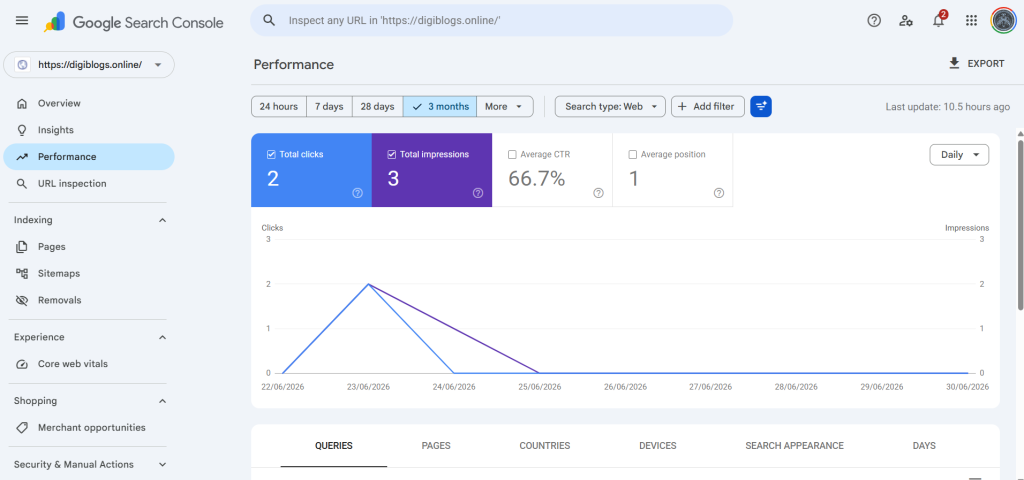
Google Search Console is a free Google tool used to monitor, analyze, and improve a website’s performance in Google Search.
What I Can Do
- Verify website ownership
- Submit XML Sitemap
- Monitor Index Coverage
- Track Search Performance
- Analyze Clicks, Impressions, CTR & Average Position
- Fix Indexing Issues
- Inspect URLs
- Remove Broken Pages
- Monitor Core Web Vitals
- Identify Crawl Errors
Benefits
- Faster indexing
- Better keyword performance tracking
- Improved website health
- Higher search visibility
Google Analytics 4 (GA4)
Google Analytics 4 helps measure website traffic, user behavior, and conversions to improve marketing performance.
What I Can Do
- Create GA4 Property
- Install Tracking Code
- Configure Data Streams
- Track Website Visitors
- Monitor User Engagement
- Analyze Traffic Sources
- Track Events
- Configure Goals & Conversions
- Create Custom Reports
- Monitor Real-Time Visitors
Metrics I Track
- Users
- Sessions
- Engagement Rate
- Average Engagement Time
- Bounce Rate
- Conversions
- Traffic Sources
- Device Performance
Benefits
- Better audience insights
- Improved campaign performance
- Data-driven marketing decisions
Google Tag Manager
Google Tag Manager is a tag management system that allows marketers to add tracking codes without editing website code.
What I Can Do
- Install GTM Container
- Configure Tags
- Create Triggers
- Create Variables
- Set Up GA4 Events
- Configure Conversion Tracking
- Track Button Clicks
- Track Form Submissions
- Track Scroll Depth
- Track File Downloads
- Configure Custom Events
- Debug Using Preview Mode
Benefits
- Faster implementation
- Accurate tracking
- Easy tag management
- Better marketing analytics
Bing Webmaster Tools
Bing Webmaster Tools helps monitor and optimize a website’s visibility in Microsoft’s Bing search engine.
What I Can Do
- Verify Website Ownership
- Submit XML Sitemap
- Monitor Search Performance
- Track Keywords
- Inspect URLs
- Monitor Crawl Status
- Fix SEO Issues
- Analyze Backlinks
- Identify Broken Links
- Monitor Index Coverage
Benefits
- Better Bing rankings
- Additional organic traffic
- Improved website performance
- Enhanced SEO insights